Free U.S. Continental Shipping on orders $35+ ● No Sales Tax outside California

MyWaterClub Product Support
Deionization (DI) Inline Filter — 10″ × 2″
DI-QC
Amazon: DI-QC
This page covers where the filter goes, how to install it, how to test TDS, when to change it, and the parts that fit it.
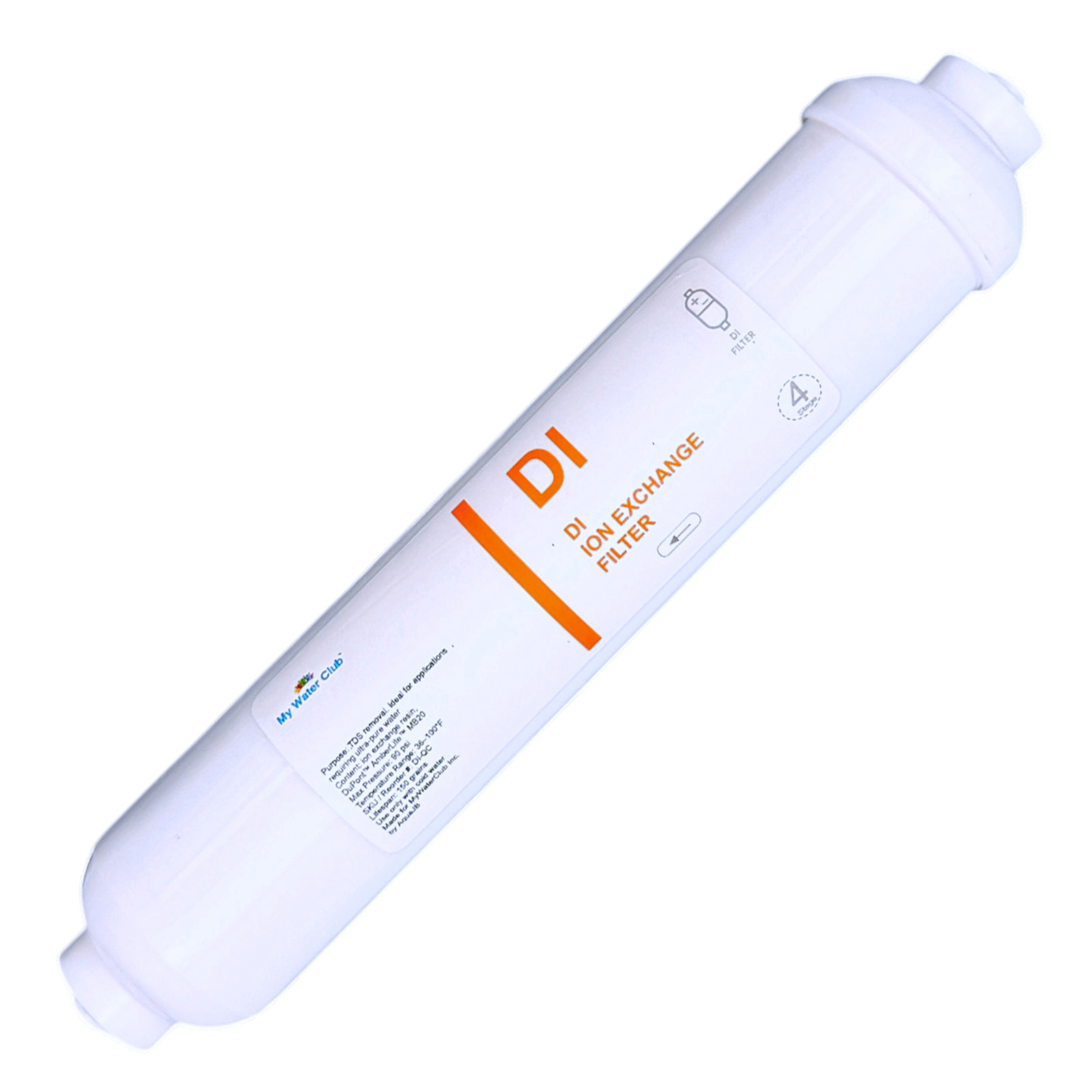
Is this your filter?
Check these against the filter in your hand. All four should match.
- ✓A white inline filter about 10″ long and 2″ across
- ✓The label says DI or deionization filter
- ✓1/4″ quick-connect ports at both ends and a FLOW arrow on the label
- ✓It came with elbow adapters for 3/8″ tubing
Is a DI filter right for your setup?
- You want near-zero TDS for an aquarium, lab, hydroponics, a humidifier or RO polishing — this page.
- You want minerals added back for taste — that’s the opposite job. 4-in-1 mineral filter → · Alkaline filter →
- Carbon, sediment or other specialty filters — see the full guide. Inline filter guide →
Specifications
| Model / SKU | DI-QC (website and Amazon) |
| Media | Mixed-bed ion-exchange resin (DuPont AmberLite MB20) |
| What it does | Removes the dissolved solids left after the RO membrane: about 0–1 ppm from RO water near 20 ppm (up to about 15 ppm when the RO water is higher) |
| Size | 10″ × 2″ |
| Connection | 1/4″ quick connect · elbow adapters for 3/8″ OD tubing |
| Pressure / temperature | Max 90 PSI · 36–100°F, cold water only |
| Typical life | Depends on your RO water’s TDS — about 150 grains of capacity (see “When to change”) |
| Brand | MyWaterClub |
Reorder this filter
This filter · DI-QC
Deionization (DI) Inline Filter
On MyWaterClub.com you choose 1/4″ or 3/8″ tubing, and the price per filter drops when you buy more. On Amazon it’s sold as a single filter.
Where it goes
A DI filter always goes after the RO membrane and is for RO water only. For drinking water it sits before the carbon post filter.
| Your setup | Order of stages |
|---|---|
| Under-sink RO | Pre-filters → RO membrane → storage tank → DI filter → carbon post filter → faucet |
| Countertop RO | Faucet adapter → sediment → carbon → RO membrane → DI filter → carbon post filter |
| Aquarium, lab, hydroponics, humidifier | RO system → DI filter → container or reservoir |
Where not to use it
- On a plain tap water line (fridge, ice maker, coffee maker) — tap water uses up the resin within days.
- Before the RO membrane — same reason. The RO does the heavy work; DI only polishes what’s left.
- After a mineral or alkaline filter — it would remove the minerals those filters add.
Connections
Before you cut anything
- Check your tubing size. It is either 1/4″ OD or 3/8″ OD, usually printed on the tubing. Use the matching adapters. Never force 1/4″ tubing into a 3/8″ port, or the reverse.
- Water must flow the way the arrow on the label points.
- You need a tubing cutter (or a sharp utility knife), a towel and a small bucket.
- 1/4″ tubing goes straight into the filter’s quick-connect ports. 3/8″ tubing: first push a 3/8″ elbow adapter into each filter port until it stops, and tug to check it holds.
- Cut the tubing square. A 90° cut. A cut off by about 15° or more will leak. The last inch should be round, smooth and free of scratches.
- Remove any blue C-clips from the adapters. A clip left in stops the tube from seating.
- Push the tube in until it stops, then pull gently to confirm it holds.
- Refit the blue C-clips on every quick-connect port.
To remove a tube later: turn off the water and release pressure, take off the C-clip, push the collar in toward the filter and pull the tube out while holding the collar.
Installing on an under-sink RO
First time? Watching a short video helps: search YouTube for “add inline filter to RO system”.
- Shut off the RO water supply and the tank valve, then open the RO faucet to release pressure.
- Find the spot: after the storage tank and before the carbon post filter.
- Check the tubing size and that the adapters match, then cut the tubing square over a towel.
- Connect the filter with the FLOW arrow pointing toward the faucet, and refit the C-clips.
- Secure the filter with a clip: a 2.5″ × 2″ clip onto the membrane housing, or a 2″ × 2″ clip onto another inline filter.
- Open the supply and tank valves. Check for leaks now, after 10 minutes, and the next day.
- Flush the new filter for at least 5 minutes with the RO faucet open. Let the tank fill, then discard the first full tank.
- Write the install date on the label.
Countertop RO: follow your system’s manual. Put the DI filter between the RO membrane and the carbon post filter, and flush it for at least 5 minutes before using the water.
Aquarium, lab, hydroponics or humidifier: connect the DI filter to the RO system’s output and run it into your container. A slower flow gives a lower TDS reading and makes the resin last longer.
When to change your filter
A DI filter doesn’t run on a calendar. It lasts until the resin is used up, and how fast that happens depends on how much is left in your RO water. A TDS meter tells you when it’s time.
| TDS of your RO water | Roughly how much DI water per filter |
|---|---|
| About 10 ppm | About 250 gallons |
| About 20 ppm | About 130 gallons |
| About 50 ppm | About 50 gallons |
Estimates from the resin’s rated capacity of about 150 grains. Fast flow and an older RO membrane shorten it.
Replace it when…
the TDS right after the DI filter climbs well above the reading you got in its first weeks. Write that starting reading on the filter label or the booklet, and test once a month.
Testing TDS
- Wait one week after installing new filters. Carbon dust from new filters makes early readings too high.
- Run the water 5–10 minutes, rinse the cup with the sample water, then fill it and test.
- Test in the right place: right after the RO membrane to judge the RO, and right after the DI filter to judge the DI.
- What to expect after the DI: about 0–1 ppm when the RO water is near 20 ppm. With higher RO TDS it can read up to about 15 ppm.
- At the faucet it can read 2–6 ppm higher. That’s normal: the carbon post filter after the DI adds a little.
Full testing steps in the inline filter guide → · TDS meters and water testing →
Parts that fit this filter
| Part | Notes |
|---|---|
| 1/4″ stem × 3/8″ quick-connect elbow, 2-pack | Adapters for 3/8″ tubing |
| T33 carbon post filter | Goes right after the DI filter, before the faucet |
| Blue C-clips for 3/8″, 10-pack | Locks the tube in a 3/8″ port · clips for 1/4″ ports |
| 2.5″ × 2″ mounting clips, 2-pack | Clips the filter onto an RO membrane housing · 2″ × 2″ clips · 2″ screw-mount clips |
| Tubing cutter with release tool | Square cuts on 1/4″ and 3/8″ tubing |
| 3/8″ OD tubing, white | If you need extra length · 1/4″ tubing |
All tubing, clips and fittings →
Common questions
| What you’re seeing | Most likely cause |
|---|---|
| TDS after the DI is not near zero | High TDS coming from the RO, fast flow, or a new system with carbon dust. Check the RO water first, slow the flow, and retest after a week. |
| TDS after the DI is rising | The resin is getting used up. Replace the filter. An older RO membrane sends more TDS and uses the resin faster. |
| TDS at the faucet is higher than after the DI | Normal. A carbon post filter adds about 2–6 ppm. |
| TDS is higher right after installing new filters | Carbon dust. Run the water 5–10 minutes and retest after a week. |
| Drip at a quick-connect port | Tube not fully in, scratched or cut at an angle, or the C-clip was left in. Release, recut square, push it fully in and refit the clip. |
| Low flow | Filter installed backward or kinked tubing. Check the arrow and the tubing. |
Need help?
Contact us
Send a photo of the filter label and your system, plus your TDS readings, and we’ll help
Call or text (858) 345-7345. Bought on Amazon? You can also reach us through Amazon: Your Orders › Contact seller.
Scope note: A DI filter reduces dissolved solids (TDS) in RO water. It is not a substitute for an RO system or for disinfection. Use it on municipally treated or otherwise microbiologically safe water. Deionized water contains almost no minerals; for drinking, keep a carbon post filter after it.
Please note: TDS results and filter life depend on your source water, the condition of your RO system, flow rate and usage, so results vary from home to home. This product is not certified to treat water of unknown quality and is not a substitute for testing your water.