Free U.S. Continental Shipping on orders $35+ ● No Sales Tax outside California

MyWaterClub Product Support
Inline Coconut Carbon Block, 5 Micron — 10″ × 2″
CB5-QC14
Same SKU on Amazon
This page covers where the filter goes, how to install it, when to change it, and the parts that fit it.
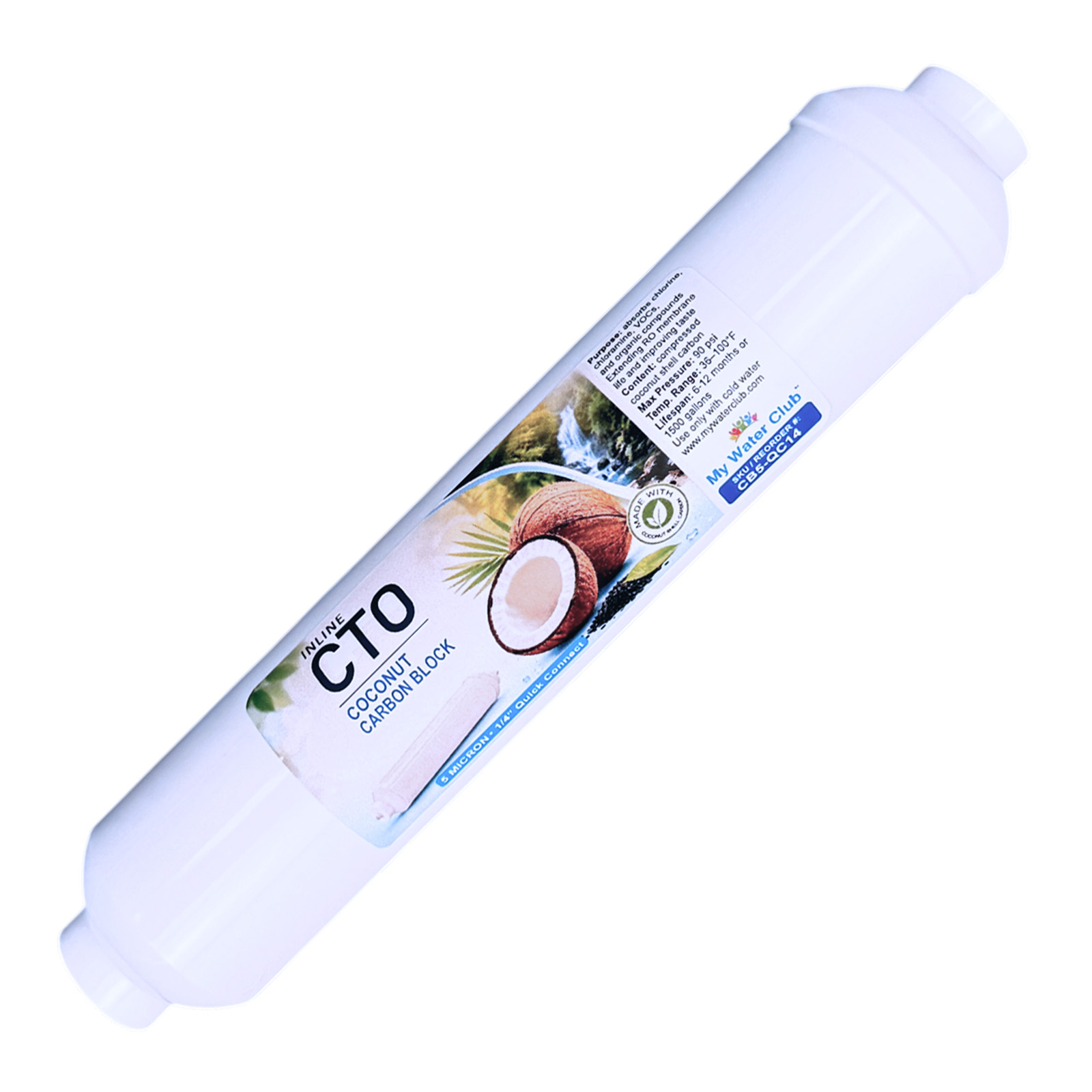
Is this your filter?
Check these against the filter in your hand. All four should match.
- ✓A white inline filter about 10″ long and 2″ across
- ✓The label says Inline CTO · Coconut Carbon Block, with a coconut picture
- ✓1/4″ quick-connect ports at both ends and a flow arrow on the label
- ✓SKU / Reorder # CB5-QC14 in the blue box on the label
Is a carbon filter what you need?
- Chlorine taste or odor — this page.
- Grit, sand, rust or cloudy particles — that needs a sediment pre-filter, installed before this one. Inline sediment filter →
- Hardness, dissolved solids (TDS) or fluoride — a carbon filter doesn’t reduce these. An RO system does. Countertop RO systems →
- Other inline filters (DI, mineral, alkaline, specialty) — see the full guide. Inline filter guide →
Specifications
| Model / SKU | CB5-QC14 (website and Amazon) |
| Media | Compressed coconut shell activated carbon block, 5 micron nominal |
| What it does | Reduces chlorine taste and odor, and catches fine particles. It does not reduce minerals, hardness or dissolved solids. |
| Size | 10″ × 2″ |
| Connection | 1/4″ quick connect, for 1/4″ OD tubing |
| Pressure / temperature | Max 90 PSI · 36–100°F, cold water only |
| Typical life | 6–12 months or 1,500 gallons |
| Made in | Taiwan |
| Brand | MyWaterClub |
Reorder this filter
This filter · CB5-QC14
Inline Coconut Carbon Block, 5 Micron, 1/4″ Quick Connect
Buy one at a time or stock up. The price per filter drops when you buy more.
Where it goes
For the longest life, put a carbon filter after a sediment pre-filter. The sediment stage catches grit, so the carbon block clogs less.
| Your setup | Order of stages |
|---|---|
| Fridge or ice maker line | Cold water line → sediment filter → this carbon filter → fridge or ice maker |
| Coffee maker or water cooler | Cold water line → sediment filter → this carbon filter → appliance |
| Countertop RO | Faucet adapter → sediment → carbon (this filter) → RO membrane → carbon post filter. Follow your system’s manual for which stage it replaces. |
| Under-sink RO, post filter | Storage tank → this carbon filter → RO faucet |
Placement rules
- Mineral and alkaline filters always go after this filter, never before it. Carbon removes minerals too.
- Hot water lines — not for hot water. Cold water only, 36–100°F.
Connections
Before you cut anything
- Check your tubing size. It is either 1/4″ OD or 3/8″ OD, usually printed on the tubing. Use the matching adapters. Never force 1/4″ tubing into a 3/8″ port, or the reverse.
- Water must flow the way the arrow on the label points.
- You need a tubing cutter (or a sharp utility knife), a towel and a small bucket.
- 1/4″ tubing goes straight into the filter’s quick-connect ports. For 3/8″ tubing, add a 3/8″ elbow adapter (see “Parts”) to each port first.
- Cut the tubing square. A 90° cut. A cut off by about 15° or more will leak. The last inch should be round, smooth and free of scratches.
- Remove any blue C-clips from the adapters. A clip left in stops the tube from seating.
- Push the tube in until it stops, then pull gently to confirm it holds.
- Refit the blue C-clips on every quick-connect port.
To remove a tube later: turn off the water and release pressure, take off the C-clip, push the collar in toward the filter and pull the tube out while holding the collar.
Installing on a water line
For a fridge, ice maker, coffee maker or water cooler line. Expect a few drops when you cut the tubing. If you are adding a sediment pre-filter too, install it first, on the supply side.
- Turn off the water to the line, then open a faucet to release pressure.
- Pick a straight section of tubing with room for the filter and gentle bends. Check that the tubing is 1/4″ OD.
- Put a towel and a small bucket underneath, then cut the tubing square.
- Remove any blue C-clips. Push the supply-side tube into the filter until it stops, and tug to check. The arrow on the label points toward the appliance.
- Flush the filter for at least 5 minutes into the bucket or a sink, until the water runs clear. Grey water or black specks at first are carbon dust from a new filter.
- Connect the outlet side to the appliance line and refit the C-clips on both ports.
- Turn the water on. Dry the fittings and check for leaks now, after 10 minutes, and the next day.
- Secure the filter with 2″ screw-mount clips so its weight doesn’t pull on the tubing, and write the install date on the label.
RO systems: follow your system’s manual. Shut off the supply first. As a carbon stage, it goes after the sediment filter and before the membrane; as a post filter, between the tank and the faucet. Flush it for at least 5 minutes before using the water. On an under-sink RO, discard the first tank after a filter change.
When to change your filter
| Filter | Typical interval | Change sooner if… |
|---|---|---|
| Coconut carbon block | 6–12 months or 1,500 gallons, whichever comes first |
The chlorine taste or smell comes back, or the flow drops. |
| Sediment pre-filter (if used) | 3–12 months | Flow drops or the filter looks dark. Many people change both on the same day. |
A TDS meter won’t tell you when to change a carbon filter — it doesn’t reduce dissolved solids. A new carbon filter can even add 2–6 ppm of carbon dust for a few days. If you test TDS or pH, wait a week after installing.
Parts that fit this filter
| Part | Notes |
|---|---|
| 1/4″ stem × 3/8″ quick-connect elbow, 2-pack | Adapters for 3/8″ tubing |
| 5 micron inline sediment pre-filter (SED-QC) | Goes right before this filter and protects it from grit · all sediment filters |
| Blue C-clips for 3/8″, 10-pack | Locks the tube in a 3/8″ port · clips for 1/4″ ports |
| 2.5″ × 2″ mounting clips, 2-pack | For RO housings · 2″ screw-mount clips for a wall or cabinet · 2″ × 2″ clips |
| Tubing cutter with release tool | Square cuts on 1/4″ and 3/8″ tubing |
| 3/8″ OD tubing, white | If you need extra length · 1/4″ tubing |
All tubing, clips and fittings →
Common questions
| What you’re seeing | Most likely cause |
|---|---|
| Grey water or black specks at first | Carbon dust from a new filter. Flush longer; it clears. |
| Chlorine taste or smell is back | The carbon is used up. Replace the filter. |
| TDS went up a few ppm | Normal for a new carbon filter (usually 2–6 ppm of carbon dust). Test again after a week. |
| Low flow | The filter is clogged, installed backward, or the tubing is kinked. Check the arrow and the tubing. A sediment pre-filter before it keeps the block from clogging. |
| Cloudy water right after installing | Air in the line. It clears after a few minutes of running water. |
| Drip at a quick-connect port | Tube not fully in, scratched or cut at an angle, or the C-clip was left in. Release, recut square, push it fully in and refit the clip. |
Need help?
Contact us
Send a photo of the filter label and your setup, and we’ll tell you where it goes
Call or text (858) 345-7345. Bought on Amazon? You can also reach us through Amazon: Your Orders › Contact seller.
Scope note: This is a carbon filter. It reduces chlorine taste and odor and catches fine particles. It does not reduce minerals, hardness, dissolved solids or fluoride, and it is not a certified microbiological purifier. Use it on municipally treated or otherwise microbiologically safe water.
Please note: Filter life depends on your water quality, pressure and usage, so results vary from home to home. This product is not certified to treat water of unknown quality and is not a substitute for testing your water.